← Return to Master Partner Blueprint / Silo 1: Setup & Management
How to Generate and Deploy Deriv Sub-Affiliate Links: The Complete Technical Tracking & Scaling Blueprint
In modern financial brokerage management, individual trader acquisition represents a linear business model. For every individual trader an introducing broker onboards, manual support, educational onboarding, and customer retention workflows must be continuously maintained. Conversely, enterprise affiliates scale by deploying multi-tier sub-affiliate networks.
Deriv operates one of the most sophisticated multi-tier affiliate clearinghouses in the global retail derivatives sector. As a qualified Master Partner, you possess the capability to recruit secondary creators, Telegram signal providers, algorithmic quant teams, and regional trading academies into your organization. Instead of earning purely from direct end-users, you collect institutional overrides across entire trading books managed by subordinate partners.
Deploying this architecture requires an exact understanding of tracking mechanics. Configuring an incorrect tracker parameter routes prospective partners into retail trading accounts rather than affiliate dashboards, permanently invalidating multi-tier override tracking.
This 3,000+ word technical guide covers the end-to-end link deployment process: locating the hidden Master Partner routing module, contrasting MyAffiliate and DynamicWorks URL frameworks, deploying dynamic campaign tracking parameters, tracking multi-tier conversion pipelines, and scaling a secondary affiliate sales team.
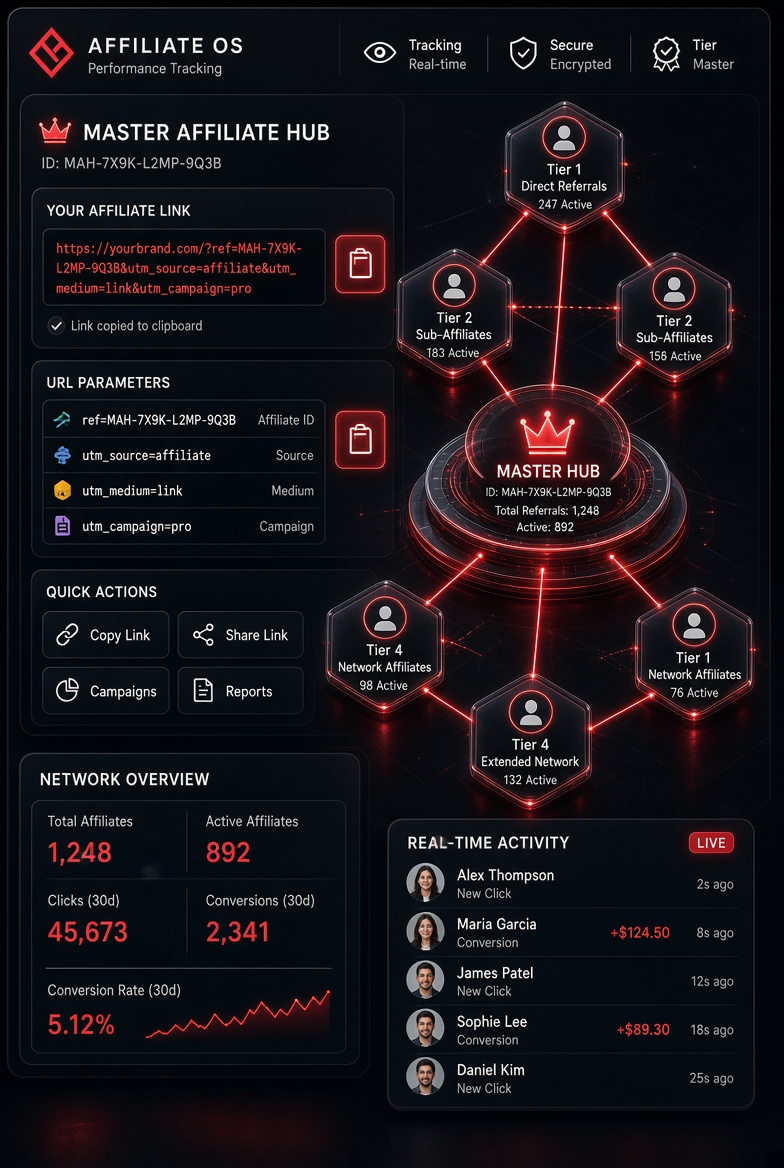
Figure 1: Technical tracking parameter workflow within the institutional Deriv Master Partner architecture.
Blueprint Contents
- Technical Anatomy of Multi-Tier Tracking Parameters
- Locating the Master Partner Tab Inside the Deriv Console
- MyAffiliate vs. DynamicWorks Referral Formats Compared
- Step-by-Step URL Generation Protocol (Field-by-Field)
- Dynamic Sub-Tracking: Utilizing Campaign Tags (s1, s2, s3)
- Override Commission Economics: How Payout Calculations Work
- Auditing Your Referrals: Tracking Real-Time Onboarding Metrics
- The 4-Channel Sub-Affiliate Recruitment Playbook
- Frequently Encountered Link Errors and Immediate Fixes
- Frequently Asked Questions (FAQ)
1. Technical Anatomy of Multi-Tier Tracking Parameters
Every affiliate tracking ecosystem relies on unique query strings appended to base URLs. In standard direct retail promotions, the broker attaches your affiliate ID (AID) to drop a persistent HTTP cookie in the visitor's browser. When that visitor registers for a trading account, the clearinghouse binds their unique client ID to your commission wallet.
Sub-affiliate tracking functions on a completely distinct architectural layer:
- The Onboarding Endpoint: Standard affiliate links route to retail registration gateways (e.g., trading account portals). Sub-affiliate links route to institutional partner portals designed for partner onboarding.
- Parent-Child Database Association: When an applicant clicks your dedicated sub-affiliate URL, the platform registers your master affiliate ID as the immutable "Parent Partner."
- Perpetual Override Binding: Once established, every single downstream tracking link generated by that newly onboarded affiliate inherits an automated override tag. Every trade executed by their client base streams volume commissions upward to the parent organization.
2. Locating the Master Partner Tab Inside the Deriv Console
New partners frequently complain that they cannot locate sub-affiliate recruitment tools. This confusion stems from Deriv’s dashboard interface, which consolidates retail trader tracking and partner recruitment into a single unified tab group.
To locate your dedicated recruitment links:
- Log into your authorized partner terminal at
partners.deriv.com. - Navigate to the primary overview screen and locate the card titled "Your referral link".
- Notice the three distinct toggle selectors positioned immediately above the link fields:
- Revenue share: Generates links onboarding direct retail traders into options, multipliers, and spot FX revenue models.
- Turnover: Generates links onboarding direct retail traders into volume-based lot rebate accounts across MT5 and cTrader.
- Master Partner: The dedicated institutional gateway. Clicking this toggle completely alters the generated URLs beneath, transforming them into sub-affiliate recruitment assets.
3. MyAffiliate vs. DynamicWorks Referral Formats Compared
Upon selecting the Master Partner toggle, the dashboard displays two distinct link formats: MyAffiliate referral link and DynamicWorks referral link. Understanding their differences prevents broken attribution.
| Evaluation Parameter | MyAffiliate Referral Format | DynamicWorks Referral Format |
|---|---|---|
| URL Structure Pattern | https://track.deriv.com/_L... | https://deriv.partners/rx?s... |
| Underlying Technology | Enterprise third-party affiliate engine managing multi-tier commission splits. | Direct CRM integration layer deployed across native brokerage portals. |
| Tracking Persistence | Multi-cookie persistence with resilient fallback redirect protocols. | Server-side session binding matching direct onboarding forms. |
| Recommended Deployment | Universal. Ideal for automated web redirects, SEO landing pages, and email sequences. | Direct one-on-one outreach across Telegram, WhatsApp, and private consultations. |
4. Step-by-Step URL Generation Protocol (Field-by-Field)
Follow this protocol to ensure that your sub-affiliate parameters preserve attribution across global network paths:
- Activate the Master Partner Toggle: Inside your dashboard card, click Master Partner.
- Select the MyAffiliate Link Container: Locate the
https://track.deriv.com/...field. - Copy Direct to Clipboard: Never manually re-type tracking URLs, as a single omitted alphanumeric character, underscore, or case variation severs attribution. Click the integrated Copy Icon immediately adjacent to the text field.
- Validate in an Incognito Browser: Open a completely isolated private browser instance. Paste your copied link and press enter. Observe the destination URL in your browser's address bar. It should cleanly resolve to an official Deriv Partner Registration page displaying introductory explanations of the partner program.
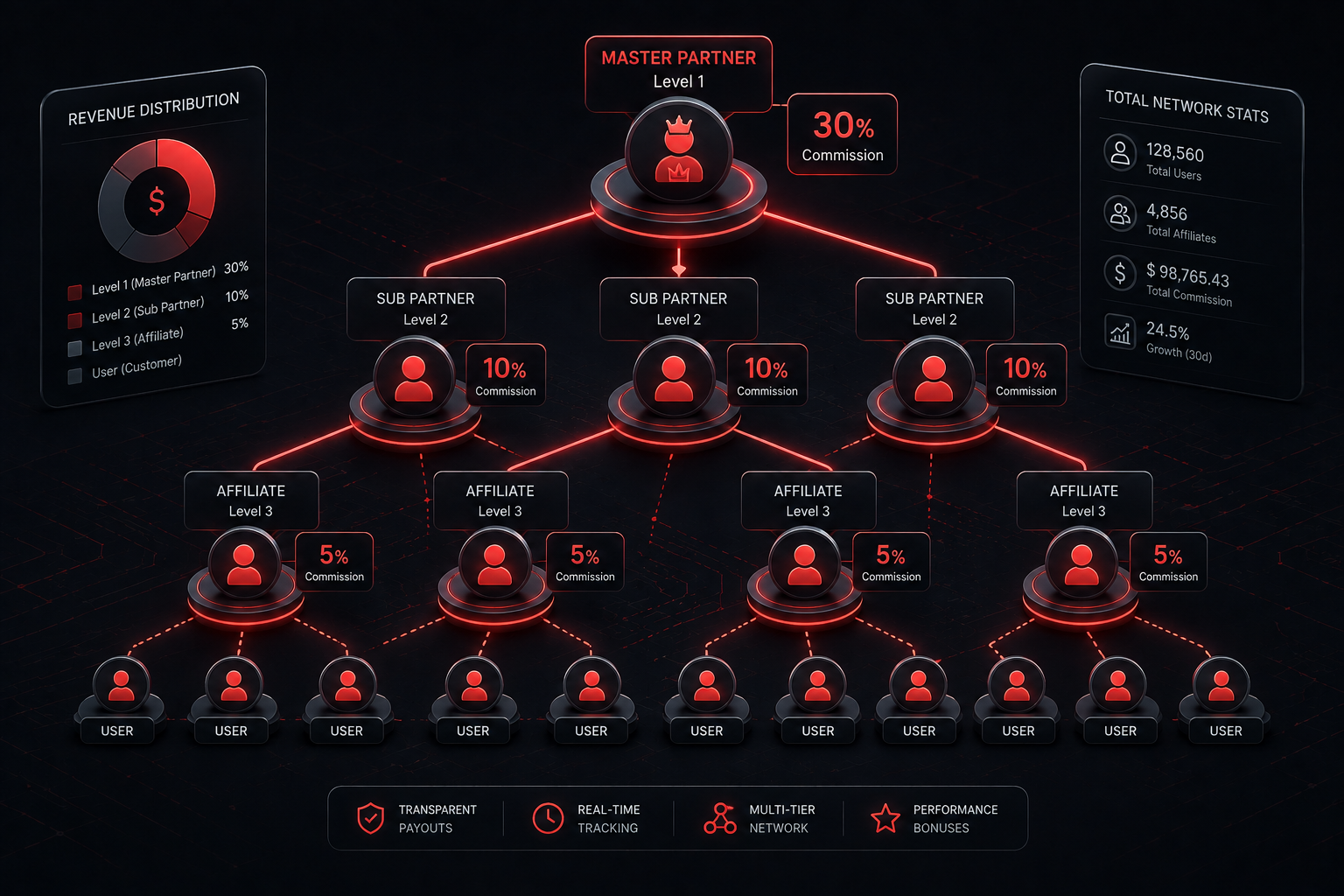
Figure 2: Architectural schematic of multi-tier commission distribution from client volume up to the Master Partner.
5. Dynamic Sub-Tracking: Utilizing Campaign Tags (s1, s2, s3)
When deploying link distribution at scale across multiple channels (YouTube, Telegram, SEO Blogs, Email Lists), using a raw, untagged URL prevents data analysis. You cannot identify which specific recruitment asset delivered high-producing partners.
Deriv supports dynamic tracking parameters via sub-ID appending. Within the advanced tracking generator, you can pass custom parameters:
- Sub ID 1 (Traffic Channel): E.g.,
telegram_cryptooryoutube_tutorial - Sub ID 2 (Content Format): E.g.,
banner_ctaordescription_link - Sub ID 3 (Geographic Focus): E.g.,
latam_leadsorasia_partners
When appended, your link structure resembles:
https://track.deriv.com/_LXXXXXXXX?s1=youtube_review&s2=cta_button_top
Inside your dashboard analytics reports, every incoming registration surfaces these exact sub-IDs, enabling you to calculate return-on-ad-spend (ROAS) and focus resources strictly on your highest-converting recruitment channels.
6. Override Commission Economics: How Payout Calculations Work
To understand the financial potential of sub-affiliate scaling, you must analyze how override cash flow compounds over multi-month operational horizons.
Under Deriv's Master Partner protocol, override commissions typically calculate as an institutional percentage of the sub-affiliate's earnings:
Master Partner Yield Formula
Master Cash Flow = Σ (Sub-Affiliate Monthly Net Commission × Master Override Rate)
Example Scenario: You recruit 15 trading content creators and Telegram community managers. Over a 6-month period, each sub-partner builds a client book averaging $1,500 in monthly commission payouts.
Total Gross Production = 15 Partners × $1,500 = $22,500.00 / month
Master Partner Override (assuming 15% tier) = $22,500 × 0.15 = $3,375.00 / month
This $3,375 monthly revenue stream operates with high passive durability. You are not answering individual end-user support inquiries regarding lot sizes, MT5 configurations, or withdrawal verification; the subordinate partners manage their respective communities while you focus on onboarding and strategic support.
7. Auditing Your Referrals: Tracking Real-Time Onboarding Metrics
Once you launch your sub-affiliate links, monitor your recruitment pipeline within the partner console:
- Navigate to the Reports tab in the left-hand navigation interface.
- Select Sub-Affiliate Summary (or Master Partner Performance).
- Filter by reporting timeline (e.g., current calendar month).
- Audit the critical performance columns:
- Direct Hits: Total unique clicks across your recruitment links.
- Signups: Total partners who successfully completed registration.
- Active Sub-Partners: Partners whose client books generated real-money trading activity during the billing cycle.
- Override Earnings: Total secondary commission accrued directly to your master account.
8. The 4-Channel Sub-Affiliate Recruitment Playbook
Generating consistent sub-affiliate onboarding requires structured value delivery. Top master partners deploy four primary acquisition funnels:
Channel 1: Signal Community & Channel Administrator Outreach
Across Telegram, WhatsApp, and Discord, thousands of trading mentors deliver daily chart setups and trading signals. Many monetize poorly through sporadic subscription fees.
Conduct direct, value-first outreach: Demonstrate how transitioning their community to Deriv's 24/7 Synthetic Indices allows them to earn lifetime volume commissions on Crash/Boom and Volatility indices without charging their members high subscription fees. Provide them with your sub-affiliate link to establish their partner account.
Channel 2: Targeted SEO Strategy Guides (The Evergreen Engine)
Traders and digital marketers regularly search Google for information on broker affiliate programs. By publishing high-intent guides covering queries like:
- "How to become an Introducing Broker for Synthetic Indices"
- "Deriv Partner Commission Structure Explained"
- "Best Forex Broker Affiliate Programs for Telegram Admins"
You capture prospective partners at the exact moment they decide to build an affiliate business.
Channel 3: Algorithmic & Expert Advisor (EA) Developers
Software developers building automated trading bots for MT5 or cTrader often seek optimal broker liquidity for their users. Reach out to algorithmic bot developers, demonstrate Deriv’s tick-level synthetic data, and show them how embedding their partner link inside their bot software creates passive recurring revenue.
Channel 4: YouTube Case Studies and Workflow Breakdowns
Video walk-throughs showcasing partner console setups, real performance dashboards, and commission payout proofs generate high viewer conversion. Documenting how to configure the Deriv platform attracts serious partners looking for a reliable guide.
9. Frequently Encountered Link Errors and Immediate Fixes
If prospective sub-affiliates report tracking failures, audit against these common setup issues:
- Error 1: Deploying the Revenue Share Link Instead of the Master Partner Link: If an educator clicks your standard Revenue Share link, they register as a retail trader. They will not receive a partner console, and you will not earn secondary overrides. Always ensure the Master Partner toggle is active before copying your URL.
- Error 2: Broken Redirects via URL Shorteners: Aggressive URL shorteners (bit.ly, tinyurl) frequently strip query parameters or trigger corporate anti-phishing firewalls. Use direct links or self-hosted 301 redirects configured on your own custom domain.
- Error 3: Cached Retail Cookies: If a prospective partner previously visited Deriv’s main portal without clearing their browser cookies, earlier attribution tokens may take precedence. Advise candidates to complete their partner registration in an isolated private browsing window.
10. Frequently Asked Questions (FAQ)
What is the exact commission percentage paid for Master Partner overrides?
Deriv's sub-affiliate override rates are tiered based on master partner performance, typically ranging from 10% to 20% of the subordinate partner's earnings. Custom terms can be arranged through regional partner managers for enterprise partners driving significant volume.
Does the sub-affiliate know that I am earning an override from their account?
The sub-affiliate’s console displays their own personal performance, client counts, and commission payouts. It does not display the master partner's override calculations or financial reports.
Can an existing retail client become my sub-affiliate?
Yes. An individual who trades on Deriv can apply for a partner account via your sub-affiliate invitation link, establishing a separate partner dashboard linked to your master account.
When are Master Partner override commissions paid out?
Override commissions clear concurrently with primary monthly affiliate commissions, typically settling during the first two weeks of each calendar month directly into your chosen settlement account (USDT, BTC, or e-wallets).
Related Tactical Blueprints
Continue expanding your partner agency through our interconnected modules:
- How to Apply for the Deriv Affiliate Program Step by Step (Master Guide)
- Deriv Application Rejected? Compliance Audit & Appeal Guide
- Deriv Revenue Share vs. Turnover Model: Cash Flow and Volume Analysis
- Global Payout Rails: How to Withdraw Your Deriv Affiliate Commissions via Crypto
- Return to the Master Partner Hub